If you’ve found Salesforce’s MFA enforcement rollout confusing this summer, it’s not you. The schedule was announced, then staggered, then paused over a defect, then rescheduled — all within a few weeks. Meanwhile, several other security enforcements from the same 2026 wave kept moving on their original dates, which made every “wait, is this the paused one?” conversation harder than it needed to be.
So let’s untangle it. Here’s the timeline, what’s already live, what lands on July 20 — and a checklist for the week you have left.
What actually happened
The 2026 security wave includes two separate MFA mandates, and the distinction matters:
- Phishing-resistant MFA for privileged users — admins and anyone with Modify All Data, View All Data, Customize Application, or Author Apex. Only built-in authenticators (Windows Hello, Touch ID) and physical security keys (YubiKey, WebAuthn) qualify.
- MFA for all employee users — every internal user with a Salesforce or Salesforce Platform license, on every UI login. The long-standing exemption waiver no longer applies to UI logins.
The first one shipped on schedule: sandboxes on June 22, production on July 1. It’s live now.
The second one is where the drama happened. On July 1, Salesforce paused enforcement after identifying a defect in which users who already had a security key registered were incorrectly prompted to enroll a new one during phishing-resistant MFA setup. A day later, the revised schedule went out: sandboxes from July 6, staggered over a 2-day window, and production from July 20, staggered over a 15-day window.
So as of today, your sandboxes are already enforcing MFA for everyone, and production is less than two weeks out.
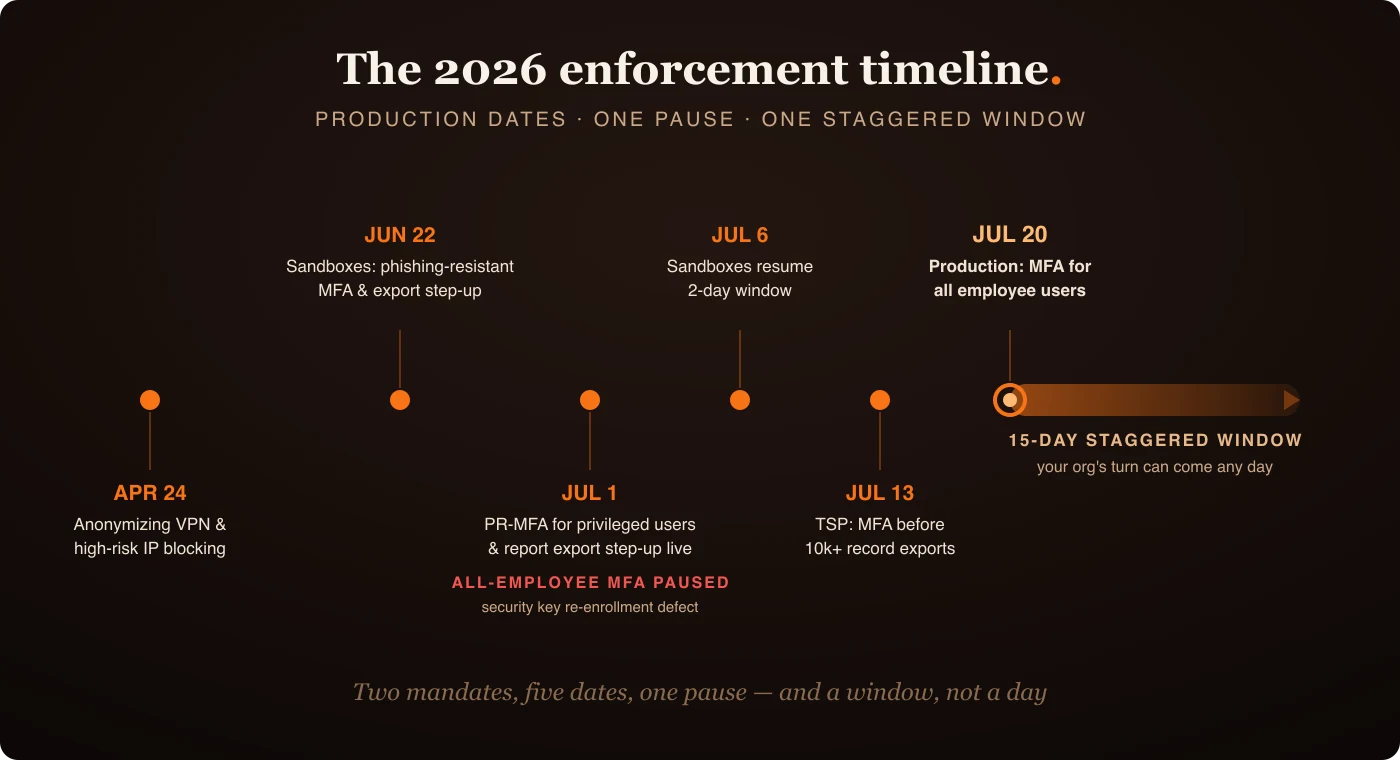
The dates that matter now
For a quick reference, here’s the whole 2026 wave as it stands:
| Enforcement | Production date | Status |
|---|---|---|
| Anonymizing VPN / high-risk IP blocking | April 24 | Live |
| Report export step-up authentication | July 1 | Live |
| Phishing-resistant MFA for privileged users | July 1 | Live |
| Transaction Security Policy (MFA before 10k+ record exports) | July 13 | This coming Monday |
| MFA for all employee users | July 20 | Staggered over 15 days |
Two details in that table deserve emphasis. The Transaction Security Policy enforcement lands this coming Monday, July 13 — an auto-generated default policy will require MFA before exporting 10,000 or more records. And the July 20 date is the start of a 15-day window, which brings me to the most common mistake I expect to see.
“Nothing happened on day one” is not an exemption
Staggered rollouts are where assumptions go to die. When July 20 passes and your org still logs in the way it did before, someone will conclude the org is exempt, grandfathered, or that the whole thing was postponed again. It wasn’t — your org is simply later in the window. Enforcement can arrive any day up to early August, and it will arrive on a day you didn’t pick.
The sandbox window works in your favor here. Sandboxes have been enforcing since July 6, which means right now you have a free, production-like preview of exactly what your users will experience. If nobody has logged into a sandbox and reported friction yet, that’s not a good sign — it means nobody has tested.
The countdown checklist
Here’s what I’d verify in any org I’m responsible for, in order:
- Check enrollment coverage. The Salesforce Labs MFA Dashboard (or a report on user login methods) tells you who has registered a verification method and who hasn’t. Every unenrolled user is a support ticket on enforcement day.
- Log into a sandbox as a regular user. Not as an admin — as a standard user. Sandboxes have been enforcing for a week; this is the cheapest end-to-end test you’ll ever get.
- Audit who’s actually “privileged.” Phishing-resistant MFA follows permissions, not titles. Run a report on Modify All Data, View All Data, Customize Application, and Author Apex — including permissions granted via permission sets. Integration and consultant users show up here more often than you’d expect.
- Verify your SSO claims. If you use SSO, users need sufficiently strong authentication signals from the identity provider (biometric or security key-backed). A weak IdP method means Salesforce will demand additional MFA on top, and your “seamless SSO” stops being seamless mid-rollout.
- Check contact data. Step-up authentication falls back on verified email and mobile. Stale contact info turns a routine verification into a lockout.
- Brief the people who export. Report export step-up is already live, and the 10k-record Transaction Security Policy goes live on July 13. Your ops and BI folks will hit these before anyone else does.
- Prepare comms for the window, not the date. Tell users enforcement arrives “between July 20 and early August,” not “on July 20.” It’s one sentence, and it prevents the exact confusion described above.
The architect’s view
None of these controls is individually complicated. What makes this rollout risky is the shape of it: two similarly named mandates, five enforcement dates, one pause, and staggered windows on top. That’s a communication problem more than a technical one — and communication problems are solved before the deadline or not at all.
The defect that triggered the pause is also worth a moment of reflection. Salesforce paused a global enforcement because already-enrolled users were being asked to re-enroll — a small bug with enormous blast radius at rollout scale. If you’re designing your own org’s rollout comms and support plan, that’s the lesson: the failure mode isn’t users refusing MFA, it’s enrolled users being told they aren’t.
Eleven days. Check the dashboard, log into that sandbox, and audit the privileged list. Future you — the one not fielding lockout tickets on a staggered Tuesday — will be grateful.
Comments